
K-TRAVEL · JULY 2026
Korail Talk Booking Guide
Ten Screenshots, One Ticket, Zero Guesswork
Everything that actually appears on screen booking an ITX-Maum ticket from Andong to Cheongnyangni, including the one screen that stumped me.
When I wrote about riding the ITX-Maum from Andong to Cheongnyangni, I promised a full screenshot walkthrough of how to book a Korail ticket in English. This is that post. Same route, same train, same Sunday morning departure — just with every screen laid out so you know exactly what you’re tapping before you tap it.
Korail Talk is the official Korail booking app, and it handles KTX, ITX-Maum, ITX-Saemaeul, Mugunghwa, and ITX-Cheongchun tickets — basically anything Korail itself operates. It’s not the prettiest app on your phone, but it’s the one most Koreans actually use, so it’s the one I’m showing you.
Andong → Cheongnyangni
travel time
to paid ticket
Getting Korail Talk on Your Phone
Install it before you land if you can, rather than scrambling for it at the station. It’s the same official Korail booking system whether you’re on Android or iPhone:
Setting the App to English
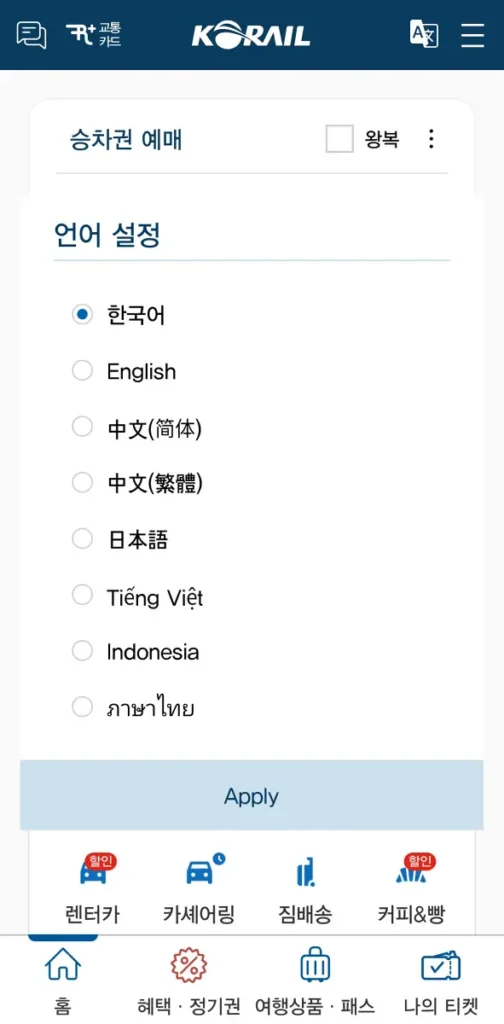
Open the app fresh and there’s a real chance the whole thing loads in Korean first. Don’t panic — you haven’t broken anything. Look at the top bar for an icon that works exactly like the language switcher you’ve seen on other Korean apps, and tap it.
That opens a full language menu: Korean, English, Simplified and Traditional Chinese, Japanese, Vietnamese, Indonesian, and Thai. Pick English, hit Apply, and the entire interface — reservation screens, payment pages, everything — switches over immediately.
Searching Your Route
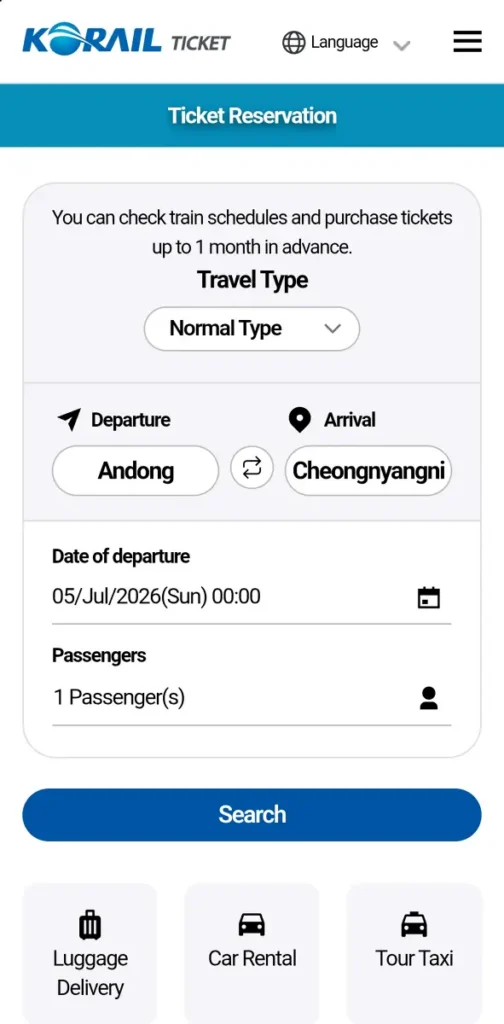
Once you’re in English, the Ticket Reservation screen is straightforward. Tap Departure and Arrival to open station pickers — both are sorted by major stations and alphabetically, so hunting for an unfamiliar station name isn’t painful. Set your date, set your passenger count, and hit Search. For this guide I searched Andong to Cheongnyangni, one passenger, the same Sunday morning slot from our original trip.
Reading the Results
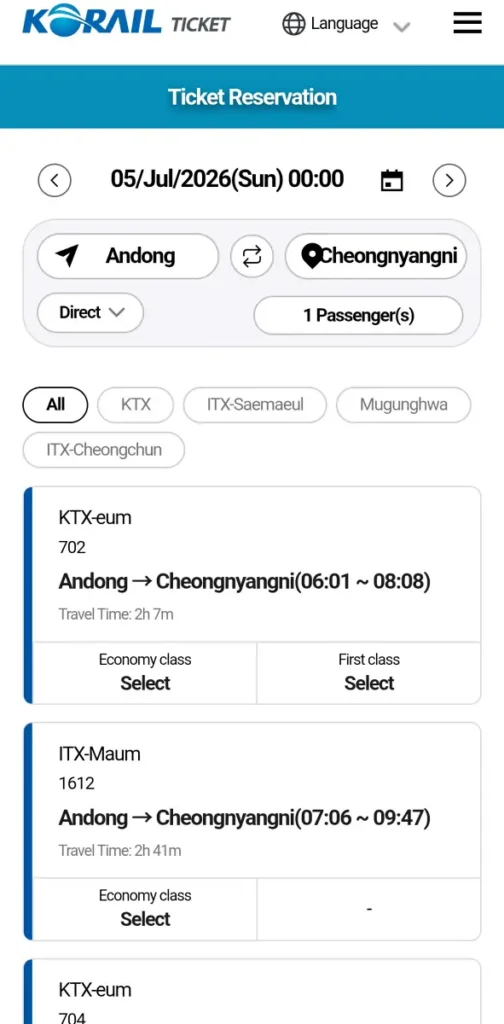
Search returns every matching departure, filterable by train type across the top — at the time of writing, that’s All, KTX, ITX-Saemaeul, Mugunghwa, and ITX-Cheongchun. Each result shows the train name and number, exact departure and arrival times, total travel time, and whether Economy and First class are open to book.
The 7:06 AM ITX-Maum 1612 from my original ITX guide was sitting right there, arriving Cheongnyangni at 9:47 — the 2h 41m from the fact strip above. A KTX-eum was also on the board that morning, faster at 2h 7m but a different fare bracket, with First class selectable too — though for a trip this length I didn’t bother.
Once you’ve picked a train from this list, three tabs appear underneath it: Train Timetable, Seat Selection, and Train Fare. You can check all three before committing to anything — nothing locks in until you actually reserve a seat.
Checking the Full Timetable
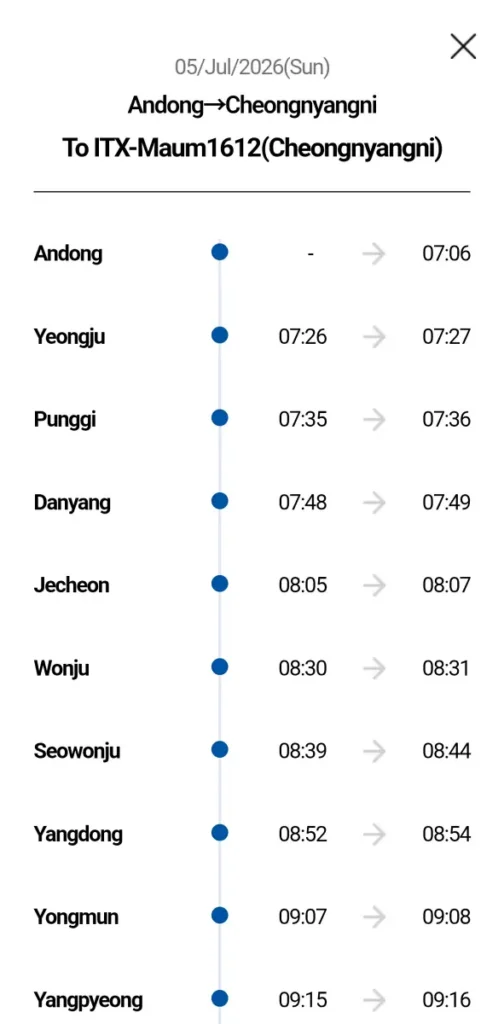
Tapping Train Timetable on the ITX-Maum 1612 result opens the complete stop-by-stop schedule: Andong, Yeongju, Punggi, Danyang, Jecheon, Wonju, Seowonju, Yangdong, Yongmun, Yangpyeong, and on toward Cheongnyangni, each with its own arrival and departure minute. It’s the same Jungang Line route we rode for the original post, just laid out station by station instead of summarized.
Choosing a Seat
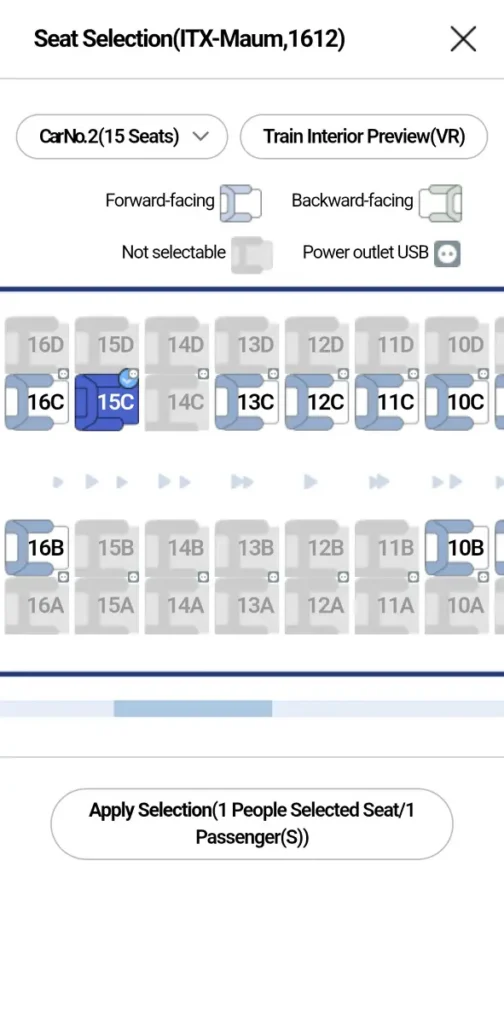
Seat Selection drops you into a real car map — Car No. 2 on this train, showing 15 selectable seats — with window and aisle positions marked, plus forward-facing versus backward-facing seats and which ones aren’t selectable. Power outlet and USB seats are flagged directly on the map too.
On the ITX-Maum I rode, the outlet sat between two seats rather than against the window wall, which felt more convenient than a lot of KTX cars, where the plug sits awkwardly behind the window-seat passenger’s shoulder. If you consider yourself long-legged, the aisle seat is the better call here — I always take it. (Screens captured July 2026 — Korail updates this app regularly, so double-check the layout against what you see.)
What This Ticket Actually Costs
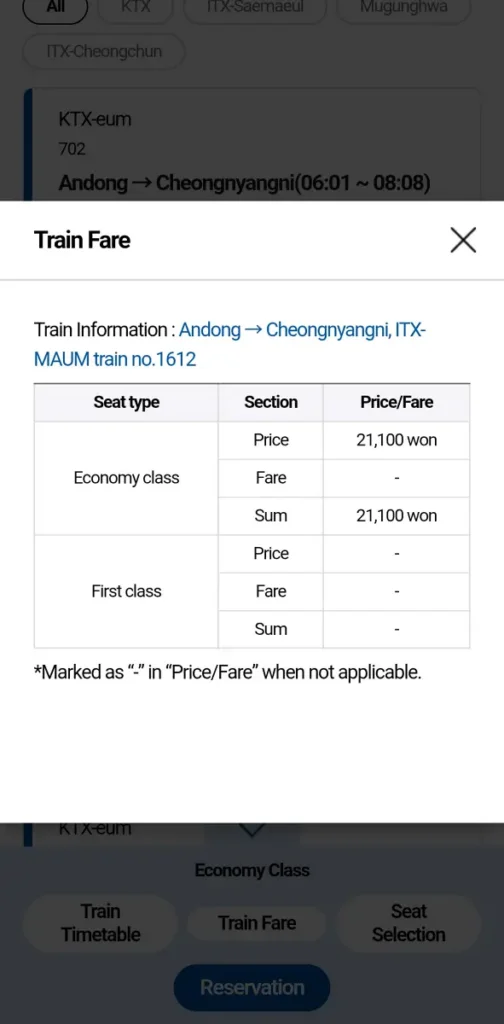
The Train Fare tab breaks the price down by seat type. For this ITX-Maum ticket, Andong to Cheongnyangni, Economy class came to a flat ₩21,100 — First class wasn’t offered on this particular train, hence the dash in that row.
For comparison, KTX Seoul–Dongdaegu runs closer to ₩43,000 in Economy — a shorter, faster route on a higher-tier train. Cheaper and slower, faster and pricier: pick your trade-off.
Registering as a Guest
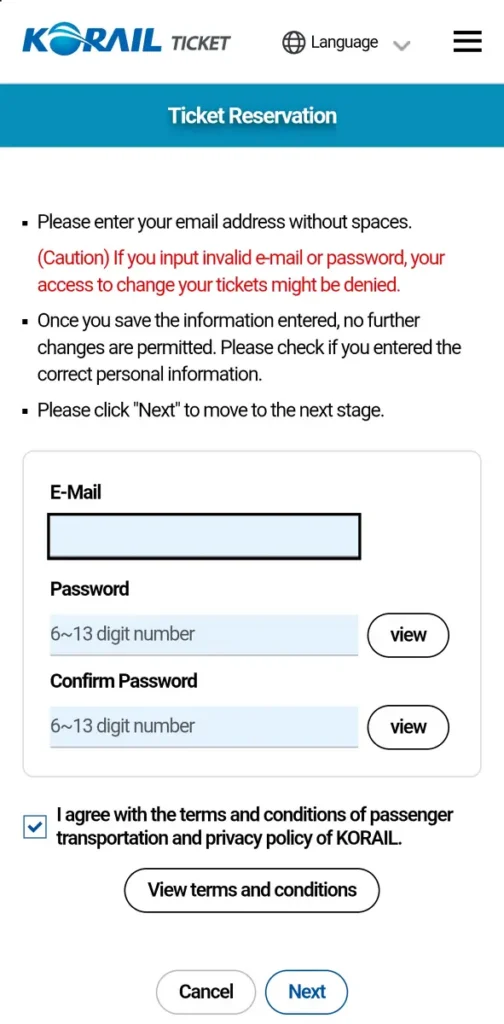
Once you’ve picked a seat and tapped Reservation, the app asks for an email address and a 6-to-13-digit password before it lets you continue — this is guest checkout, not a full membership sign-up. The app is direct about the stakes: enter your email or password wrong and you could lose the ability to manage or change your own ticket later. Once you save it, you can’t edit it. Read that screen twice before hitting Next.
Paying — Including the Screen That Confused Me
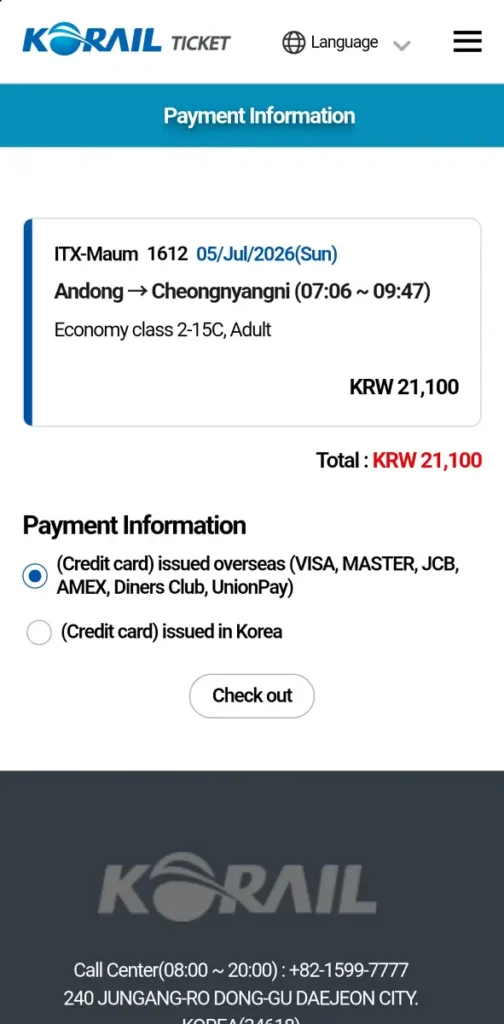
Payment Information shows a final summary before you commit: train, date, route, seat number, passenger type, and total price. Then it’s a choice between two payment options — a credit card issued overseas (Visa, Mastercard, JCB, Amex, Diners Club, UnionPay) or a card issued inside Korea. Most visiting readers will probably want the first one. Tap Checkout.
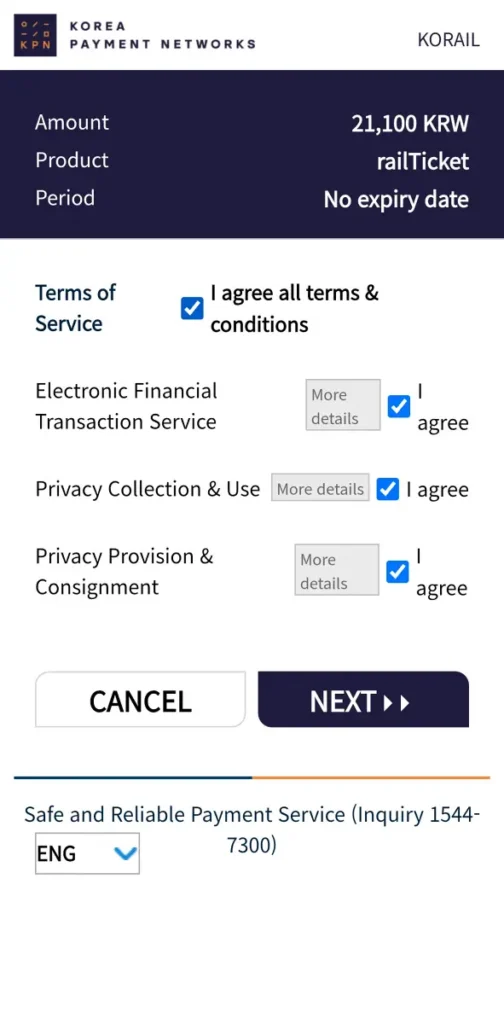
Checkout hands you off to Korea Payment Networks, Korail’s payment processor. This screen confirms the amount, the product (“railTicket”), and asks you to agree to the terms of service, the electronic financial transaction agreement, and two privacy consents. Tick the boxes, tap Next.
And then the screen that actually stopped me. It asks for your card number, but instead of one long field, it shows four separate boxes. My card number has 16 digits. Four boxes. I stared at it longer than I’d like to admit before grabbing my actual card and realizing: four digits per box, all 16 digits split evenly across them. Obvious in hindsight.
In my defense, most Koreans never see this screen either. Naver Pay, Samsung Pay, and other simple-payment services handle card entry invisibly for almost every purchase here, so typing a raw 16-digit card number by hand is something even locals rarely do anymore. It caught me off guard, so there’s a good chance it’ll catch you out too — here it is, documented, so you don’t have to guess.
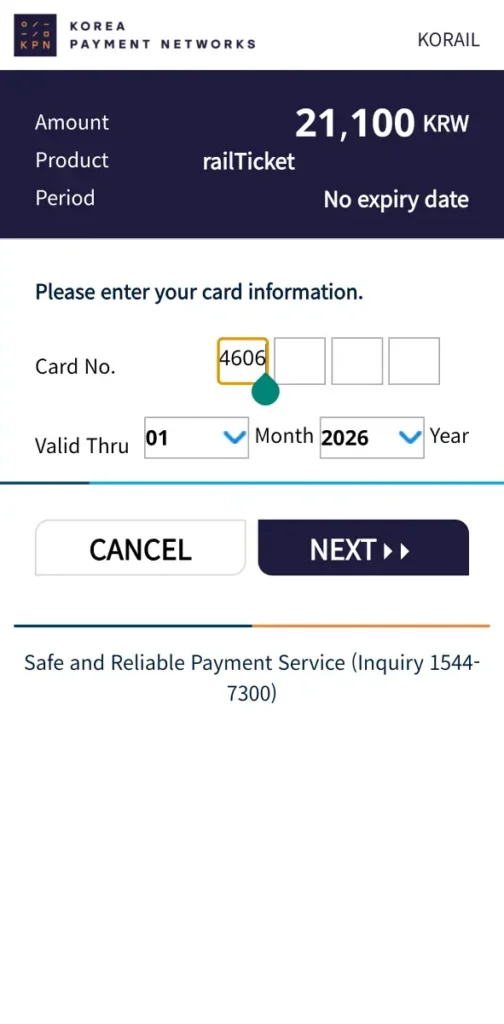
From there it’s Valid Thru month and year, then Next, and the ticket is yours — no printing required, available right in the app.
FAQ: Korail Talk Booking Guide
Yes. The train-type filter on the search results screen shows KTX, ITX-Maum, ITX-Saemaeul, Mugunghwa, and ITX-Cheongchun, all bookable through the same app.
No. You can book a Korail ticket in English from start to finish — the language switcher at the top of the app covers English, Chinese (Simplified and Traditional), Japanese, Vietnamese, Indonesian, and Thai, on top of Korean.
SRT is a separate company from Korail with its own booking system and its own app, so Korail Talk won’t complete an SRT booking for you directly. If your trip departs from Suseo Station near Gangnam, you’ll want the dedicated SRT app or website instead.
Be careful here — the app warns that an invalid email or password can block your ability to manage or change the ticket afterward, and once saved, it can’t be edited. Double-check both fields before tapping Next.
“Credit card issued overseas” covers Visa, Mastercard, JCB, Amex, Diners Club, and UnionPay — that’s the option most international travelers will choose over the Korea-issued card option.
One more thing before the verdict: our original ITX post rounded this trip down to “about two hours.” Building this guide meant looking at the schedule properly, and it’s actually 2 hours 41 minutes, 07:06 to 09:47. I rounded it too generously the first time — consider this the correction.
Korail Talk isn’t the prettiest app on your phone, but it’s the app most Koreans actually use — now you know exactly why.
Ten screens, one ticket, and only one genuinely confusing moment. Stick with Korail Talk for KTX, ITX, and Mugunghwa bookings, and just know SRT bookings get handed off to a separate app entirely.
Install Korail Talk before your trip, switch it to English on first launch, and you’re ready to book KTX, ITX, or Mugunghwa tickets from your own phone — no ticket counter line required.