
Travel Guide · Korea Rail
May 24, 2026 · Seoul Station → Dongdaegu
Writing this one live from a smooth-gliding KTX, somewhere between Seoul and Dongdaegu, while the Korean countryside blurs past the window like a watercolor painting someone forgot to let dry. Travel blogging doesn’t get more real-time than this.
Planning a trip to Busan or Daegu? Getting your ktx ticket is the first step to a smooth and fast journey across Korea.
In this guide, I will show you how to easily purchase your ktx ticket at Seoul Station’s automated machines.
Hello, fellow travelers! Welcome back to Korea Pulse, your go-to guide for pulsing through South Korea without the panic attacks.
Today I’m visiting my father, who is recovering from surgery at a hospital in Daegu. Family always comes first — fingers firmly crossed for a speedy recovery! But before I could be a devoted child, I had to be a competent traveler. And that meant buying a KTX ticket on the spot, right at Seoul Station, with zero pre-booking and a train to catch.
(Quick side note: I originally wanted to share a full breakdown of the gorgeous seamless connection from the GTX-A line directly into the KTX platforms, plus an intro to Seoul Station’s brilliant luggage storage service — a total game-changer for backpack-weary tourists. But editing a stack of heavy photos on a tiny, bouncing mobile screen is, shall we say, a thumb-breaking art form. That guide is coming soon, I promise. Today, we keep it focused.)
So! Today’s mission: Buy a KTX ticket at Seoul Station as a foreigner, using only the automated machine, without breaking a sweat. Spoiler: it is significantly easier than assembling IKEA furniture, and the machine does not ask you to find Part B.
01
Spot the “Tickets” Sign — Your First Landmark
The moment you walk into Seoul Station’s grand main hall, do not let the size intimidate you. Take a breath. Look up. You will see a massive LED display screen running the length of the concourse, and directly beneath it: a row of sleek black automated ticket machines under a sign that reads Tickets / 승차권 사는 곳, labeled in Korean, Chinese, and Japanese too. You genuinely cannot miss it — it is the most obvious thing in the room after the enormous train on the screen.
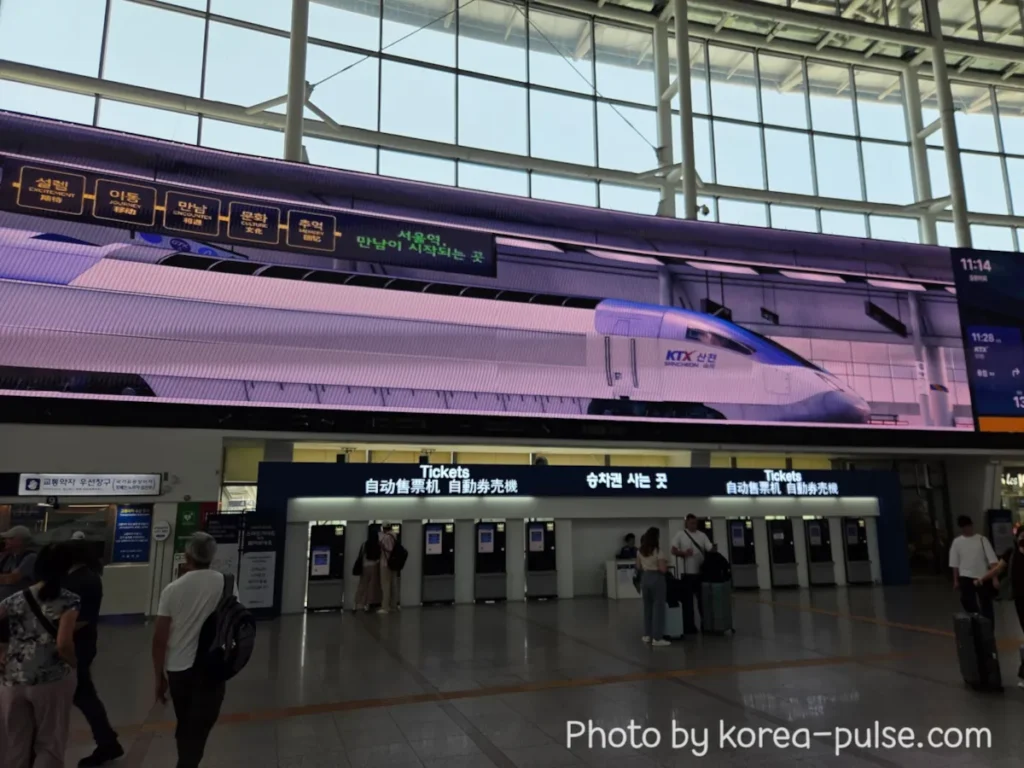
March right up to any available machine. They are all the same, so no need to queue for a “special” one.The sleek black unit in front of you is about to become your best friend for the next three minutes as you secure your ktx ticket.
02
Switch to English — Your Gateway to an Easy KTX Ticket!
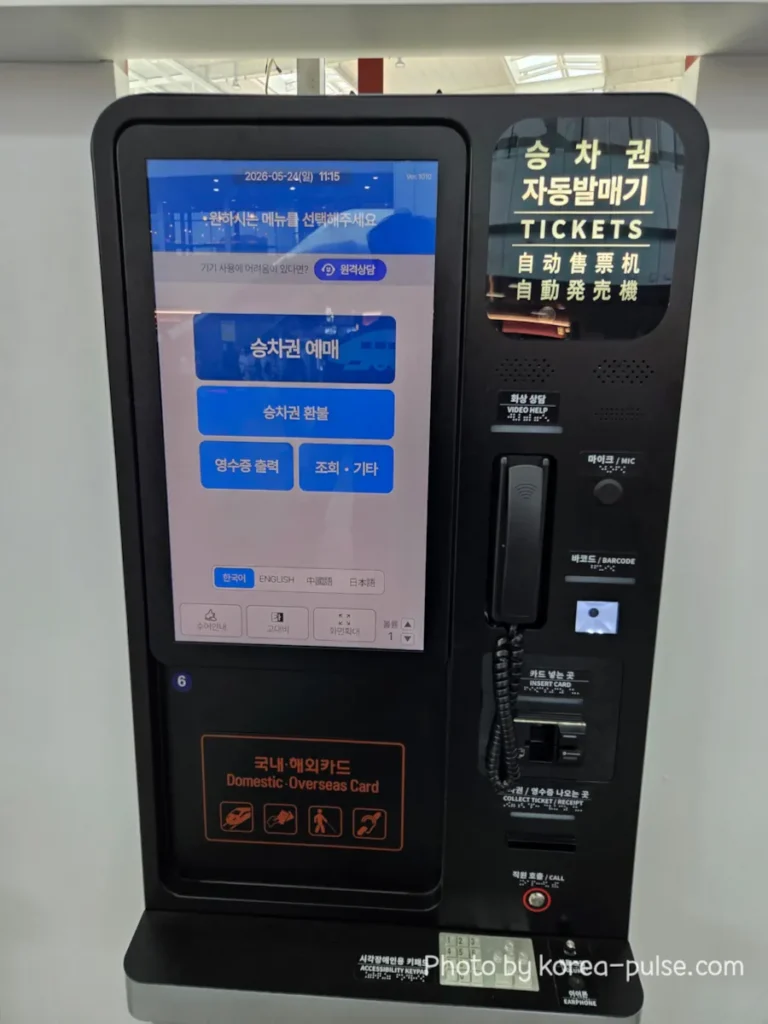
The machine will greet you in Korean. Beautiful language. Possibly looks like decorative art to you right now. No judgment — that is precisely why the language button exists.
On the default Korean screen, glance at the bottom of the display. You will see four language options: 한국어 · ENGLISH · 中國語 · 日本語. Tap ENGLISH and the whole machine transforms instantly — menus, buttons, instructions, all in English. The ticket machine is now bilingual. You’re welcome.
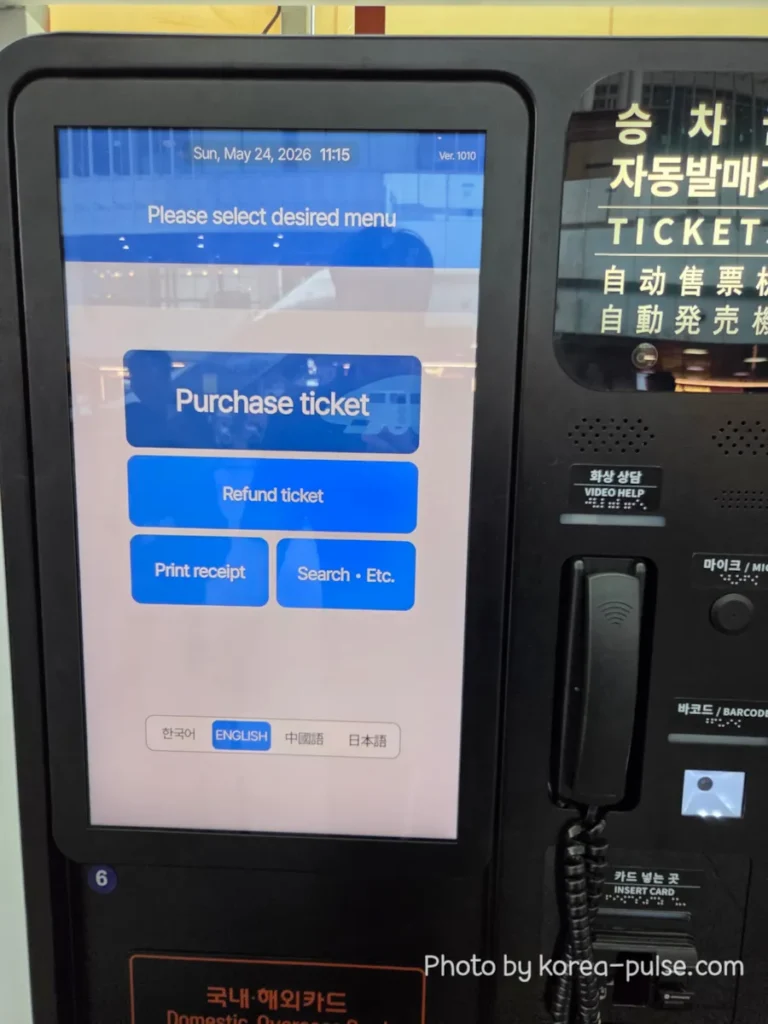
Now you will see the main English menu with four options: Purchase ticket, Refund ticket, Print receipt, and Search. We want that big blue Purchase ticket button. Go ahead, tap it with confidence.
03
Select Your Destination
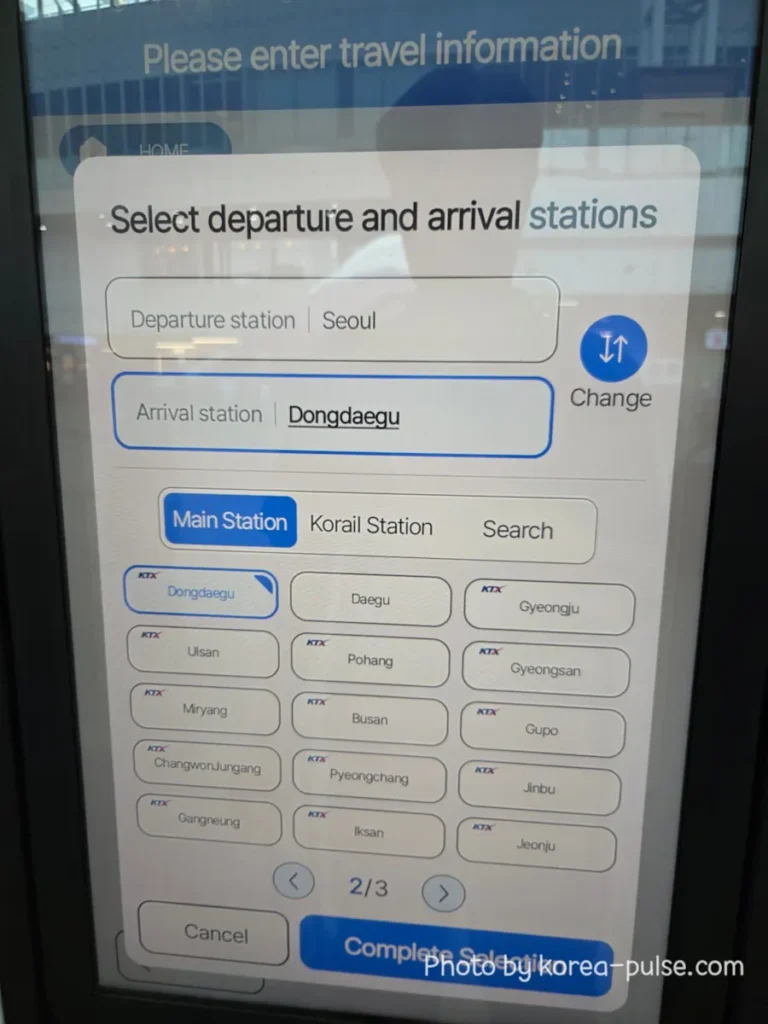
The screen will now ask you to “Select departure and arrival stations” for your ktx ticket. Good news: Seoul is already filled in as your departure. One field already done for you. The machine is helpful like that.
For the arrival station, you will see a grid of popular KTX destinations. Today mine is Dongdaegu. Tap your destination directly if it appears on the grid, or use the Search tab to type it in if you are heading somewhere less common — the database covers the entire Korail network. Once selected, tap Complete Selection.
♡ Pro Tip
If your destination does not appear on page 1 of the grid, use the arrow to scroll to page 2 or 3, or simply tap Search and type the station name. Every Korail station in Korea is in there.
04
Pick Your Train Time
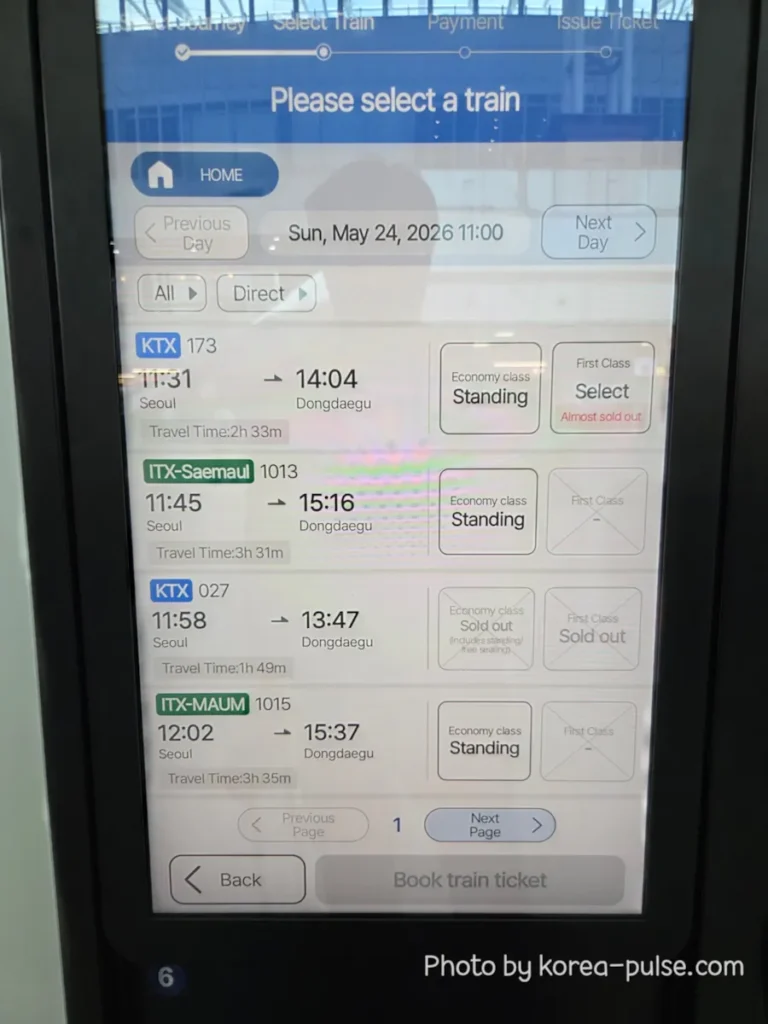
The screen now displays a real-time schedule of all upcoming trains for your route. You will see the train type (KTX, ITX-Saemaul, ITX-Maum), departure time, arrival time, total travel time, and most importantly — seat availability.
Seat options appear as: Economy class Select (seats available — grab one!), Economy class Standing (no seats left, but you can ride standing in designated cars), or Sold out (that train is gone, move to the next). First Class options appear in the right column.
♡ Pro Tip
KTX is the fastest — it beats ITX-Saemaul and ITX-Maum by a comfortable margin. Seoul to Dongdaegu in about 1h 49m on the fastest KTX vs. 3h 30m+ on the slower trains. Unless you enjoy staring out windows for extended periods, KTX wins every time.
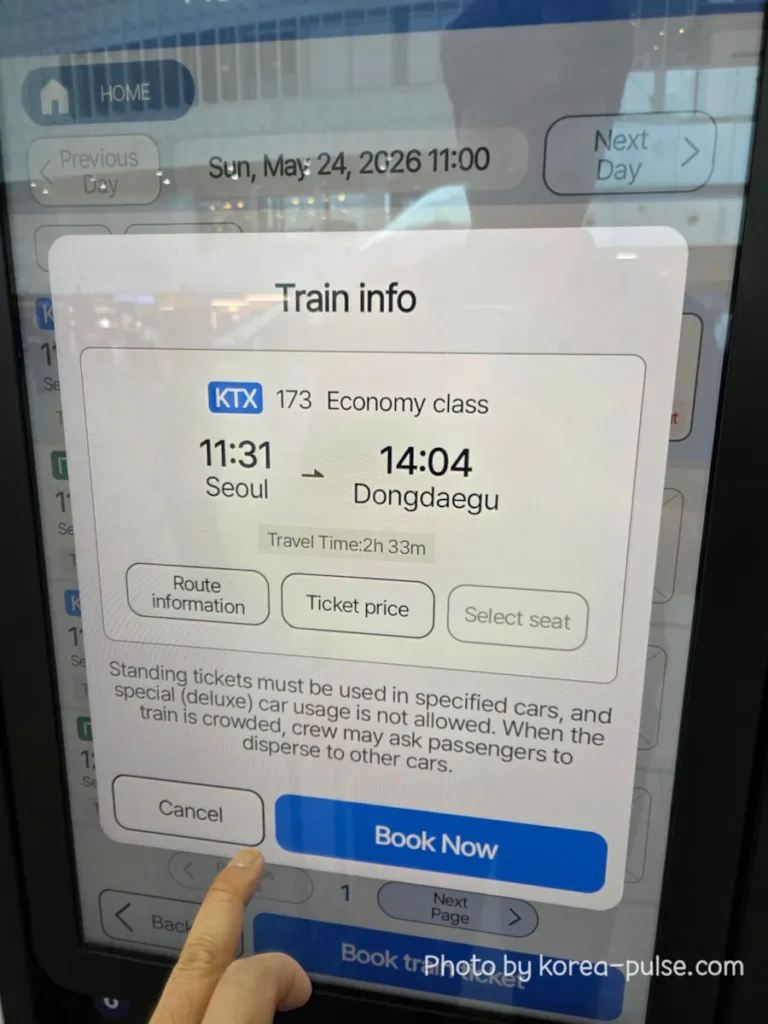
Tap the seat option you want on your preferred train to move forward with your ktx ticket purchase. A pop-up window called Train info will appear.
05
Review Train Info, Route & Price
The Train info pop-up shows you the essentials: train number, cabin class, departure time, arrival time, and travel duration. This is your last chance to double-check everything before committing. From here, you have three helpful buttons: Route information, Ticket price, and Select seat.
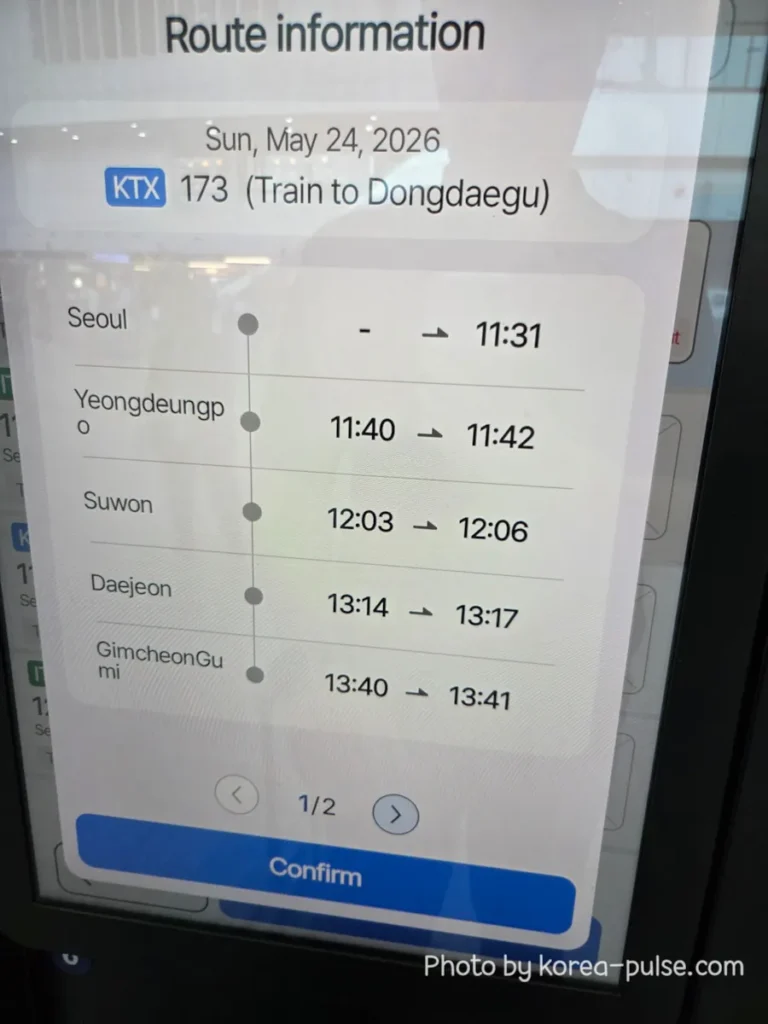
Curious about which stops the train makes? Tap Route information. It lays out every single station along the way with arrival and departure times — super useful if you want to confirm you are not accidentally riding past your stop at 300 km/h.
Then tap Ticket price to see the exact fare before your card comes out:
| Cabin | Base Fare | Fee | Grand Total |
|---|---|---|---|
| General Cabin | KRW 34,500 | — | KRW 34,500 |
| VIP Cabin | KRW 34,500 | KRW 13,800 | KRW 48,300 |
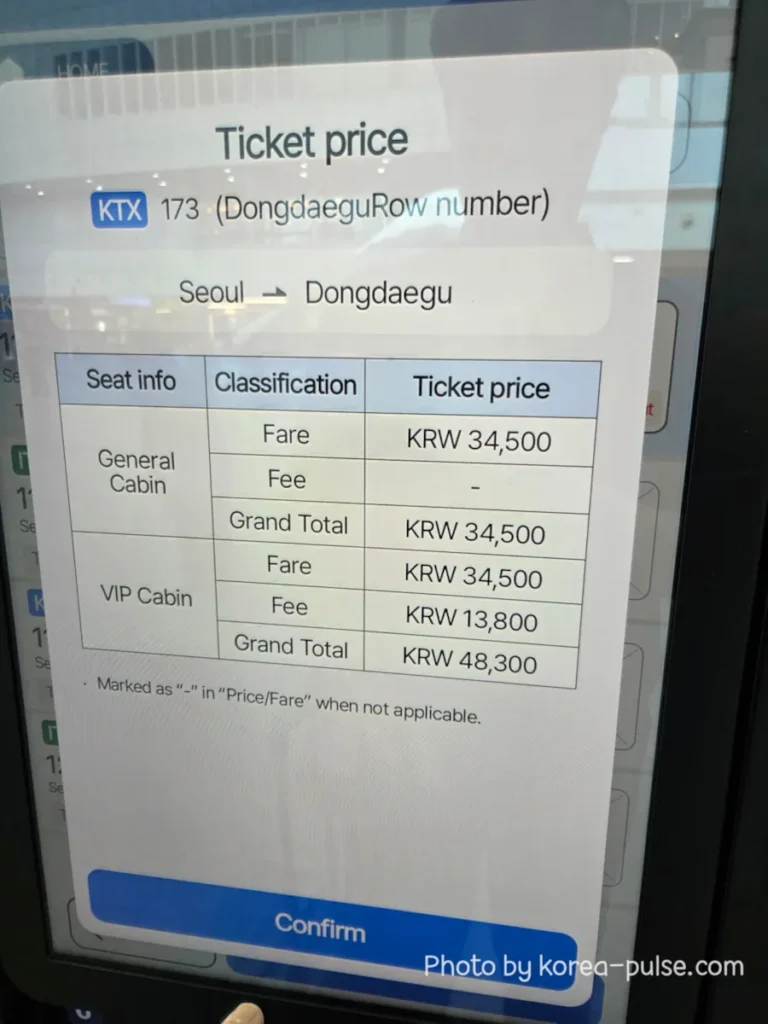
Travel time and fares can vary depending on the train, but the Seoul to Dongdaegu trip is usually around 2 hours and 30 minutes, with Economy Class starting at KRW 34,500. First Class is also available if you want extra comfort and a quieter ride.
06
Book Now — Insert Card & Collect Ticket!
Happy with everything? Back on the Train info screen, hit that big blue Book Now button. The machine accepts both domestic and international credit cards — Visa, Mastercard, and most major cards work perfectly. Slide your card into the slot labeled “카드 넣는 곳 / INSERT CARD” on the right side of the machine.
Wait a few seconds for the payment to process. Then collect your printed ticket and receipt from the slot labeled “권/영수증 나오는 곳 / COLLECT TICKET / RECEIPT” just below.
That’s it! Now that you have your ktx ticket in hand, look at the electronic board to find your platform. Grab a light snack, board the train, and enjoy the beautiful scenic ride across Korea.
♡ Pro Tip
On the Train info screen you also have a Select seat button — use it if you want to pick your exact seat number (window vs. aisle, facing forward vs. backward). If you skip it, the machine assigns one automatically. Both work fine.
✦
Wrapping Up — You’re a KTX Pro Now
Six steps. Three minutes at the machine. One printed ticket in your hand. Told you it was easier than IKEA furniture.
Korea’s high-speed rail system is genuinely one of the best in the world — clean, punctual, fast, and remarkably foreigner-friendly once you know which buttons to press. Whether you are hopping down to Busan for the beaches, to Gyeongju for the history, or to Daegu for food, culture, or a slower city vibe, the KTX machine has you covered.
Next up: I’ll be covering the GTX-A to KTX seamless connection and the Seoul Station Luggage Storage Service — two things that will change how you move around the city entirely. Stay tuned!
In the meantime, keep exploring with these:
How to Master the KTX Network — Booking in Advance & Choosing the Best Seats
How to Buy a Seoul Subway Ticket Like a Local
Official Korail Website — Book Online in English
Your Turn — Tell Me Your Station Story
Have you ever tried buying a train ticket in Korea? Did you breeze right through, get a little lost, or accidentally end up on a train to the wrong city? (It happens to the best of us.) Drop your story in the comments — I read every single one. Safe travels! 🚄