
K-TRAVEL · June 2026
This Shouldn’t Be Possible:
828 Mbps of Free Wi-Fi on a Korean Public Bus
The bus fare is real — but the Wi-Fi is completely free. Here’s how 828 Mbps happens on a Korean highway.
Korea public bus WiFi shouldn’t be capable of this. I’ve been living here long enough to stop being surprised by things — then I tested the connection on the 3300 airport express, the bus costs money but the internet does not, speeding down the highway at 100 km/h, and it hit 828 Mbps on my phone. I stood corrected.
on a moving bus
Wi-Fi (bus fare separate)
free Wi-Fi nationwide
Let’s clear something up first: the bus itself isn’t free. You pay your standard limousine fare by T-money card or credit card, same as any other Korean transit. But the Wi-Fi waiting for you inside the cabin? Genuinely ₩0, no app, no registration, and — as it turns out — faster than most paid home internet on the planet.
I pay ₩17,000 a month — roughly $13 USD — for a half-gigabit fiber line at home. It consistently delivers around 450 Mbps down and 471 Mbps up. By any global standard, that is a genuinely excellent deal. Back when I lived in the UK in 2016–2017, I handed Virgin Media nearly £30 a month for a 50 Mbps connection and felt lucky to have it. Korea spoiled me quickly.
So I boarded the 3300 limousine bus from Ilsan to Incheon International Airport for a business trip — paid my fare, found a seat — connected to the Korea public bus WiFi out of habit, and ran a speed test. Just to see. The first result came back at 668 Mbps. I stared at it for a second, then ran it again. 828 Mbps. The free on-board Wi-Fi was, at that moment, nearly twice as fast as my paid home internet. I craned my neck toward the front of the bus and took a photo of a small white router box on the ceiling. Because what else do you do.
This post is for every traveler who lands at Incheon, burns through their roaming data on the taxi to the hotel, and never thinks to look up. There is a better option — and it starts the moment you step onto a Korean bus.
Korea Public Bus WiFi: Open vs. Secure
The moment you open your Wi-Fi settings on any Korean public bus, you will see two networks. One connects instantly with no password. The other takes thirty seconds to configure and keeps your data encrypted. Here is why the thirty seconds are worth it — and exactly how to do it. (All speed results in this post were measured using Speedtest by Ookla.)
| Network Type | SSID | Login | Security & Best Use |
|---|---|---|---|
| Secured (Recommended) | Public WiFi Secure | ID: wifi / PW: wifi | WPA2/WPA3-Enterprise encrypted. Significantly safer than open Wi-Fi for email, work, and general browsing. For sensitive financial transactions, mobile data or a trusted VPN is still the gold standard. |
| Open (Convenience only) | Public WiFi Free | None — tap and connect | Unencrypted. Fine for maps, casual browsing, streaming. Avoid for anything sensitive. |
The same two SSIDs — Public WiFi Secure and Public WiFi Free — appear on buses, subways, public parks, and libraries across Korea. Configure it once and your device auto-connects everywhere in the country. One setup, entire nation.
Step-by-Step: How to Connect on Android
Korea public bus WiFi gives you two options the moment you connect: iOS connects with just a tap and the credentials. On Android (Samsung Galaxy UI shown here), follow these exact steps — no EAP dropdowns required, the interface has simplified considerably:
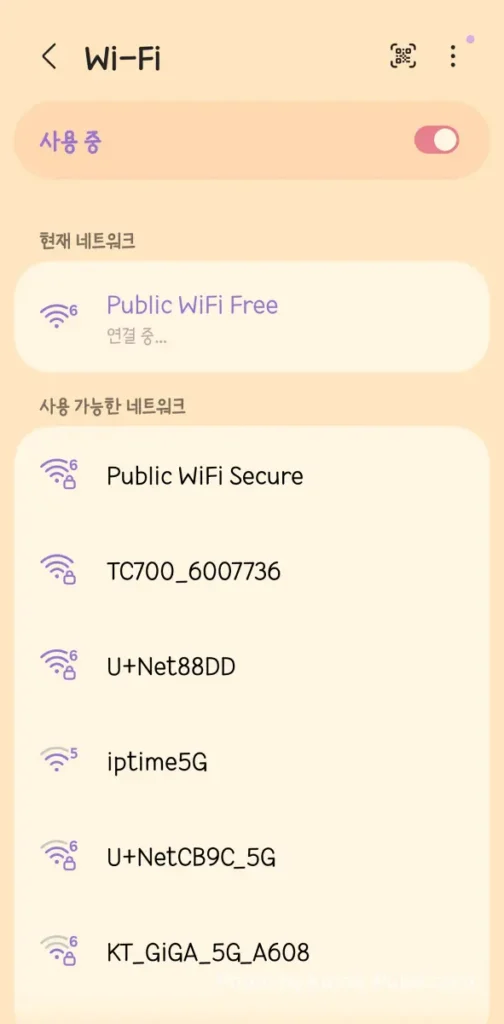
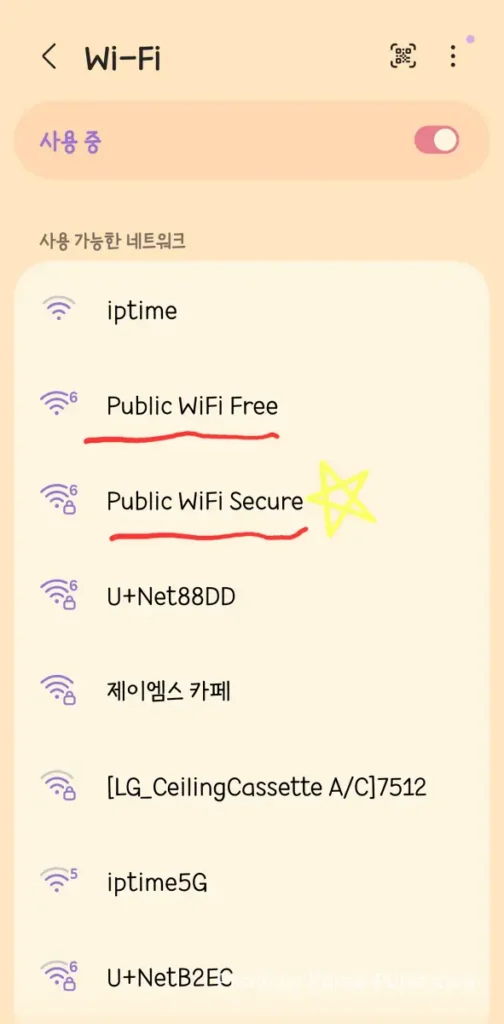
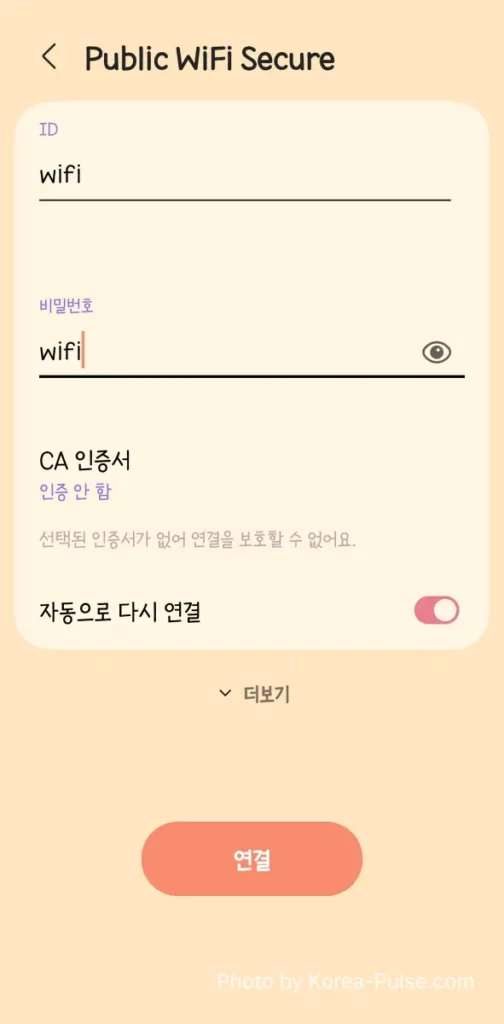
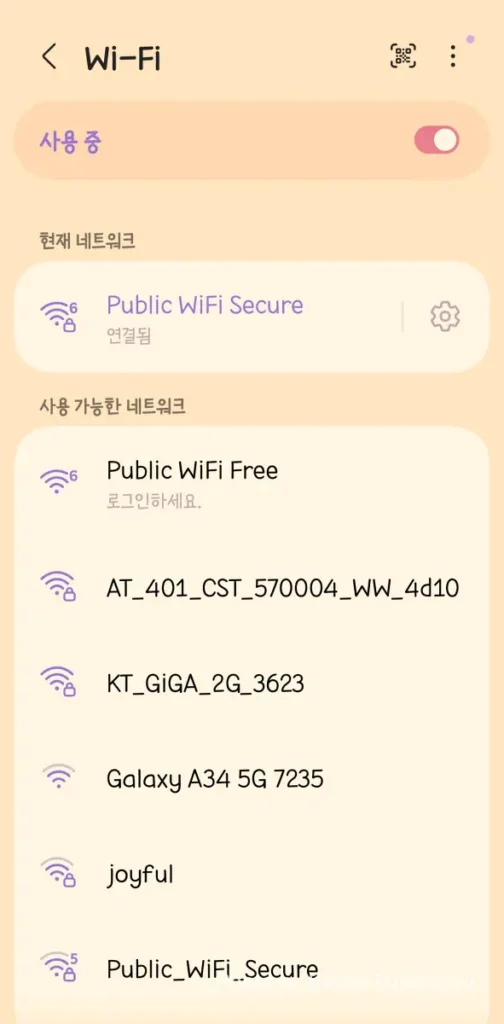
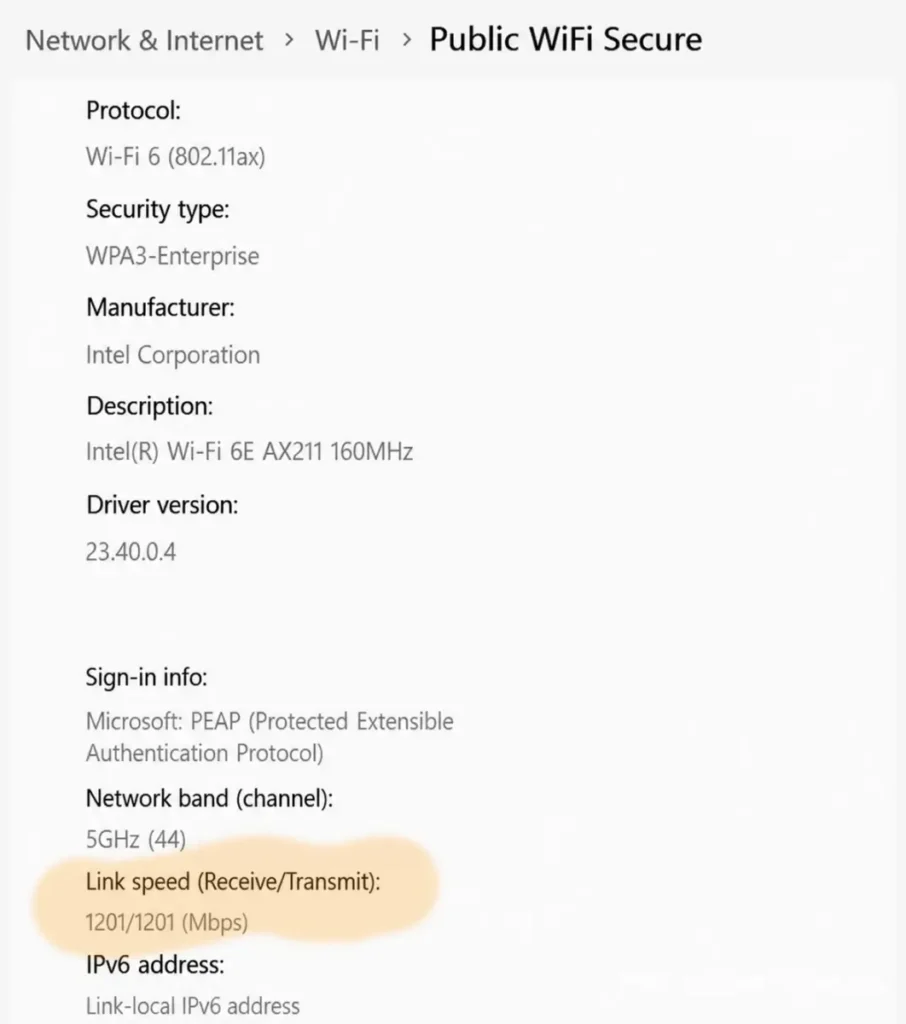
The Windows network properties screen confirms this as WPA2/WPA3-Enterprise with PEAP (Protected Extensible Authentication Protocol) — the same enterprise-grade authentication framework used by corporate and university Wi-Fi networks worldwide. “Don’t validate” skips certificate verification on the client side, which is standard practice for government-operated public Wi-Fi. Your traffic is encrypted in transit; for highly sensitive transactions, pairing with a trusted VPN adds an extra layer.
“Wait — If Everyone’s Password Is ‘wifi’, Can’t Hackers See My Data?”
This is the smartest question you can ask — and the answer is one of the more elegant pieces of engineering in this whole setup. If a hacker on the same bus also knows the password is “wifi” (which it is, publicly), surely they can intercept your traffic?
For ordinary fellow passengers: no. Here is exactly why.
On the unencrypted open network, wireless signals travel through the air with no protection at all. Anyone on the same bus running a packet-sniffing tool can intercept exactly what sites you visit and read unencrypted data in plain text. This is not theoretical — it takes about 30 seconds and free software. Never use open Wi-Fi for anything with a password.
When you connect via PEAP (802.1X Enterprise protocol), the “wifi / wifi” credentials are just the door handle — not the lock. The moment you authenticate, the SANICO router and your device negotiate a completely unique, randomly generated session key that exists only between your device and the router. Nobody else’s session key is the same, even if they connected with identical credentials one second after you.
A fellow passenger running a packet sniffer will see only indecipherable encrypted noise — they cannot reconstruct your session without your unique key. This is the same enterprise authentication framework used by corporate and university Wi-Fi systems worldwide. Korea is giving it to you for free, on a moving bus, because apparently that is just how things are here.
| Scenario | Open Wi-Fi (Free) | Secure Wi-Fi (PEAP) |
|---|---|---|
| Passenger sniffs traffic | Reads your data in plain text ❌ | Sees encrypted noise only ✅ |
| Shared password risk | No password = no barrier ❌ | Password ≠ encryption key. Each device gets its own unique session key ✅ |
| Safe for general browsing & email? | No ❌ | Yes — significantly safer than open Wi-Fi ✅ |
| Sensitive financial transactions? | No ❌ | Use mobile data or VPN for maximum safety ⚠️ |
| Encryption standard | None | WPA2/WPA3-Enterprise / PEAP (802.1X) |
Simple by design. The Ministry of Science and ICT wanted every citizen — and every foreign visitor — to access enterprise-grade encryption without a membership, app, or rotating PIN. “wifi / wifi” is the universal key that opens the secure door. The actual security happens underneath, invisibly, per device, per session. It is frankly a well-thought-out system.
Korea Public Bus WiFi vs. Home Fiber: The Speed Test
Here is what my home setup looks like on a normal day. For ₩17,000 a month, half-gigabit fiber that handles 4K streaming, remote work, and whatever the kids are doing to the bandwidth simultaneously. One of the best internet deals on the planet. I had zero complaints — until a ceiling-mounted box on a highway bus entered the conversation.
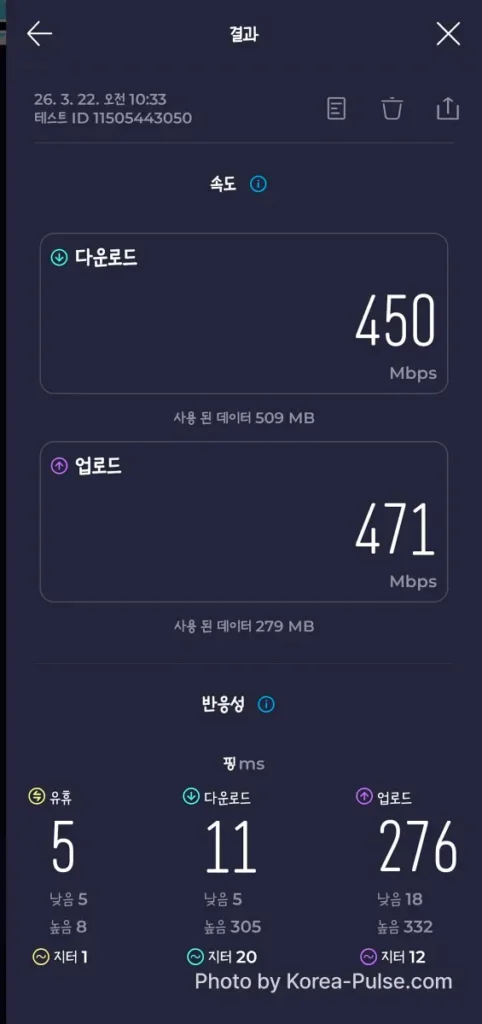
Then the bus happened.
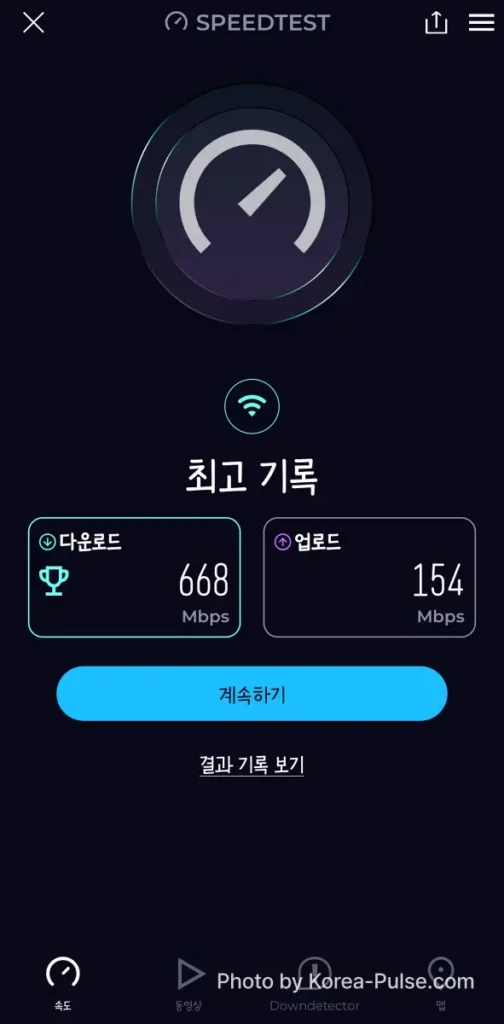
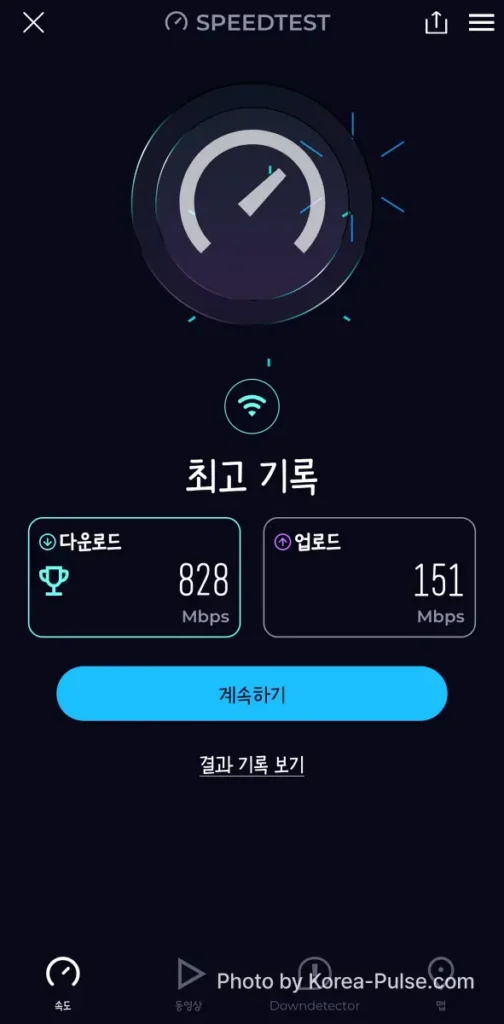
The laptop result adds one more layer. The Windows network properties screen showed a 1,201 / 1,201 Mbps Wi-Fi 6 (802.11ax) link between my Intel AX211 card and the bus router — running on the 5 GHz band, channel 44, authenticated via PEAP, security type WPA2/WPA3-Enterprise. The wireless connection between my device and the ceiling box was itself a gigabit channel. On a bus. Doing 100 km/h.
At 668–828 Mbps, you can back up your entire camera roll to iCloud or Google Photos, download a full Netflix season for offline viewing, sync a day’s worth of RAW photo files to Dropbox, or run a work video call — all before the bus reaches Incheon Terminal 1. Stop paying roaming charges. Korea already sorted the connectivity for you.
Inside the Box: The SANICO Router
After the second test came back at 828 Mbps, I did what any reasonable person would do — I craned my neck toward the front of the bus and took a photo of a small white router box on the ceiling. Mounted directly above the driver’s compartment is a compact white unit labeled SANICO. It looks like someone screwed a slightly oversized Wi-Fi access point to the headliner. Four external antennas. A row of green LED status lights blinking contentedly. That is it. That is the whole miracle.
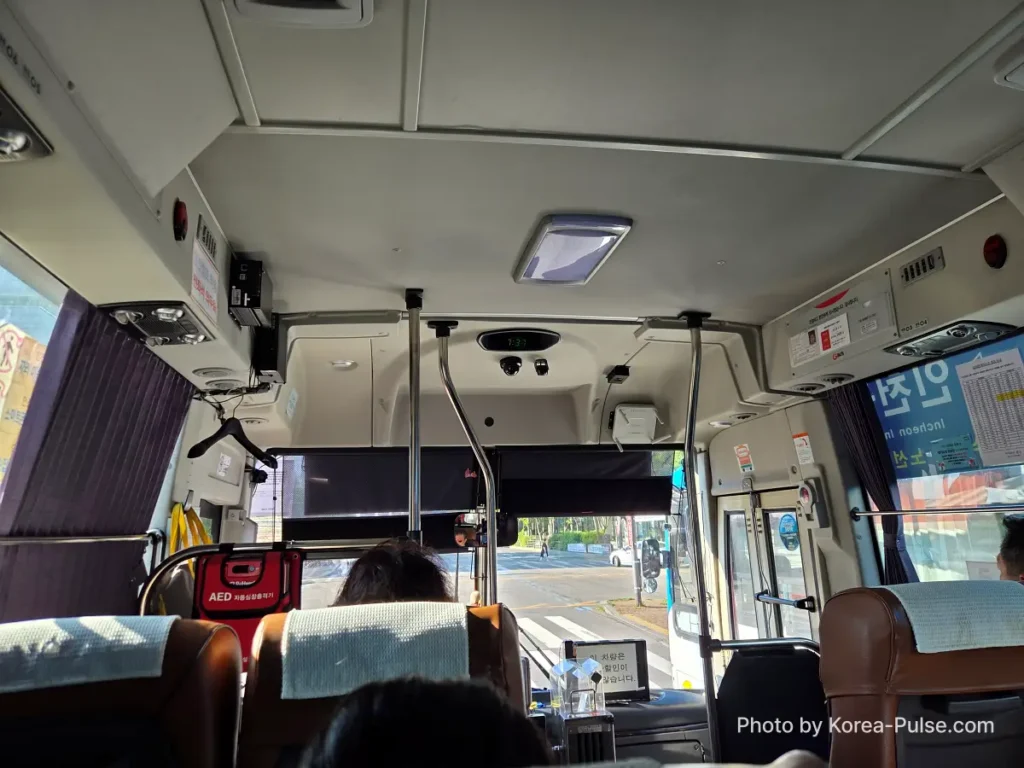
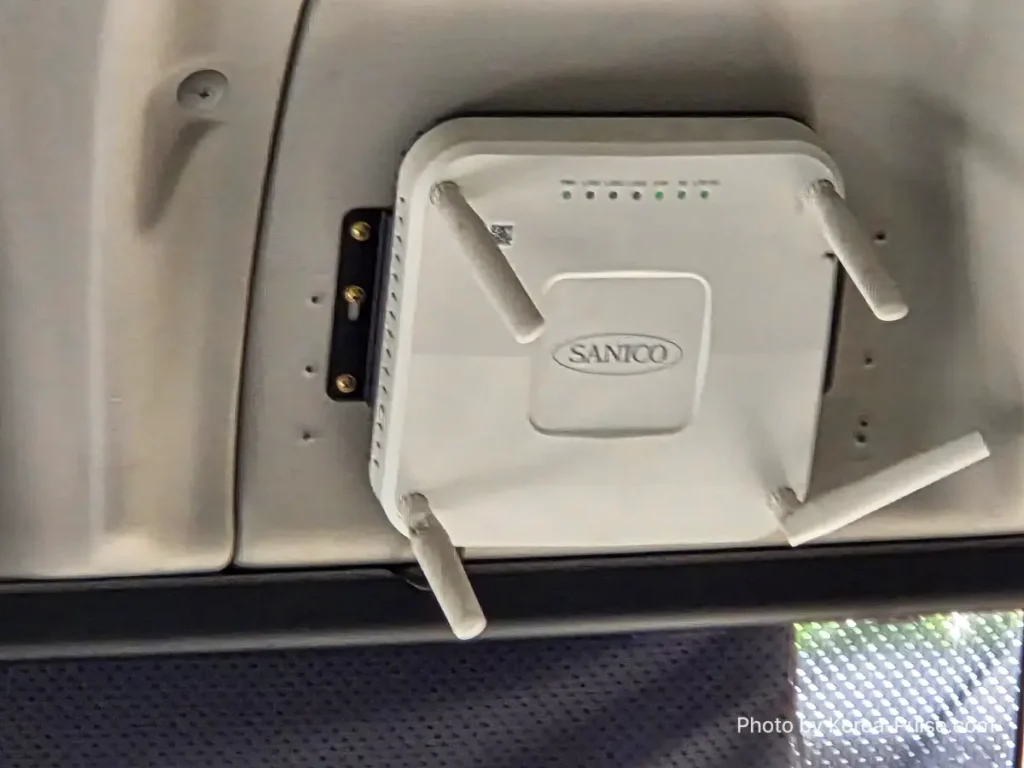
Unlike consumer routers built for living rooms, SANICO manufactures ruggedized M2M (machine-to-machine) vehicle hardware engineered for continuous highway vibration, wide temperature swings, and the demands of multi-user packet filtering on a moving platform. Vehicle routers like this typically use roof-mounted cellular antennas to connect to carrier 5G networks and redistribute the connection inside the cabin as Wi-Fi 6 (802.11ax). The Korea public bus WiFi network is operated in partnership with major carriers including SK Telecom, KT, and LG U+, with infrastructure costs covered by the government’s digital inclusion initiative.
The 3300 runs an express highway route with clear line-of-sight to 5G towers and almost no urban canyon interference. With a maximum of around 28 seats — and often far fewer passengers on weekday mornings — you may be sharing 800+ Mbps of backhaul with almost nobody. That is a near-monopoly on a gigabit pipe. City center buses on packed urban routes will naturally deliver lower speeds. Still impressive globally. Just not this impressive.
The Next Upgrade: Wi-Fi 7 Is Already Rolling Out
If 828 Mbps on a moving bus feels like a ceiling, it is not. Korea’s infrastructure ambitions do not do ceilings.
The Korea public bus WiFi system has been upgrading steadily since 2018. By 2020, over 35,000 city and intercity buses were already equipped with free Wi-Fi — described by the Korean government as a world-first nationwide city-bus Wi-Fi deployment. The 5G router upgrade that produced today’s numbers rolled out from 2021 onwards. And now, NIA (Korea’s National Information Society Agency) and the Ministry of Science and ICT have officially announced a full Wi-Fi 7 upgrade targeting 29,000 city buses nationwide, with planned rollout during 2026. Korea public bus WiFi is, by any measure, one of the most ambitious public transit connectivity programs in the world.
The upgrade comes with meaningful changes beyond raw speed: the monthly data cap per bus access point is being raised from 200GB to 300GB, and a new QoS (Quality of Service) guarantee ensures a minimum of 100 Mbps even after the monthly cap is exceeded. In practice, that means the floor of Korea’s free bus Wi-Fi will be faster than the average residential connection in most countries. For the full official details, see the Digital Daily report on the nationwide Wi-Fi 7 bus upgrade (Korean).
The pilot results were already significant before the full rollout. Where the current Wi-Fi 6 fleet averaged around 429 Mbps, Wi-Fi 7 test buses delivered between 715 and 1,003 Mbps per device, even under heavier passenger load. Average data usage per passenger climbed 20–30% — not because the quota increased, but because people immediately started using more once they discovered the extra headroom.
Wi-Fi 7 introduces Multi-Link Operation (MLO) — your device transmits and receives across 2.4 GHz, 5 GHz, and 6 GHz simultaneously. This allows the router to maintain higher throughput even under heavier passenger loads, reducing the performance gap between a quiet weekday bus and a packed commuter route. The 828 Mbps I recorded today was partly thanks to a near-empty vehicle; Wi-Fi 7 is designed to get closer to that ceiling regardless of how many people are on board.
Korea Public Bus WiFi: FAQ for Travelers
Most city buses and all major airport limousine buses provide free public Wi-Fi. Coverage and speed vary by route — airport express highways like the 3300 deliver peak performance, while packed urban routes will be lower. Subways, public parks, and libraries use the same network.
For Public WiFi Secure, use ID: wifi / Password: wifi (both lowercase). This is the nationwide government-issued credential. Settings can vary slightly by local authority, but this works on the vast majority of Korean public transit and public spaces.
Yes — no Korean phone number, T-money app, or resident registration is required. The credentials above work for any device, any nationality. Configure it once at the airport bus stop and your phone will auto-connect to the same network across the entire country.
The Wi-Fi is free. You still pay the bus fare — the 3300 limousine bus charges a standard fare by T-money or credit card. But once you’re on board, the internet connection costs nothing and requires no separate sign-up.
“Korea doesn’t treat public connectivity as a nice-to-have. It’s infrastructure — like roads, like electricity.”
When you land at Incheon and board any Korean public bus, look up. That small white box on the ceiling is doing something genuinely remarkable. Tap Public WiFi Secure, enter “wifi” twice, and enjoy a connection that would embarrass most hotel broadband in Europe or North America — for exactly ₩0. As the fleet upgrades to Wi-Fi 7, these numbers will only climb. Stop burning your roaming data. Korea already sorted this for you.
Now that you’re connected at gigabit speeds on the bus, here’s how to navigate the rest of Seoul’s equally impressive public transport system — subway guide, GTX-A, and how to buy tickets as a foreigner, all below.